


Analog Input Channels
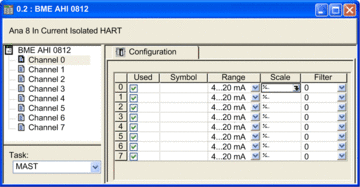
The BMEAHI0812(H) HART analog input module includes 8 input channels. To open the module for configuration in Control Expert, double-click the input module in the :
Channel Parameters
To configure an input channel, select that channel on the left side of the configuration dialog. You can edit the following parameters for each of the 8 channels:
Parameter |
Description |
|
|---|---|---|
Used |
The status of the channel:
|
|
Symbol |
(Read only) Displays the variable that has been associated with this channel. |
|
Range |
(Read only) Displays the current loop range of 4...20 mA. |
|
Scale |
Click in this field to open the following dialog where you can input the following scaling and overflow parameters: 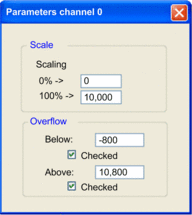 |
|
Scaling: 0%: |
Input the percentage scaling value for 4 mA current (default = 0). |
|
Scaling: 100%: |
Input the percentage scaling value for 20 mA current (default = 10,000). |
|
Overflow: Below |
The threshold between the lower tolerance area and the underflow area (default = –800). |
|
Overflow: Below (checkbox) |
The status of underflow control:
|
|
Overflow: Above |
The threshold between the upper tolerance area and the overflow area (default = 10,800). |
|
Overflow: Above (checkbox) |
The status of overflow control:
|
|
Filter |
The used to perform first order filtering of the analog signal. Values include:
|
|