


Before You Begin
You can add a BMEAHI0812(H) input module or a BMEAHO0412(C) output module only to a main rack that includes a BM XBPxx00 Ethernet backplane. If that rack is:
a local main rack, it needs to include a BME P58 x040 Ethernet CPU
a remote main rack, it needs to include a BME CRA 312 10 adapter
Adding a New HART Analog I/O Module
To add a new HART analog I/O module to the project, follow these steps:
Step |
Action |
|---|---|
1 |
In the , right click the node, and then select from the context menu. The opens. In the :
The selected bus opens. |
2 |
In the , right-click in a slot where you want to insert a HART analog I/O module. A context menu opens: 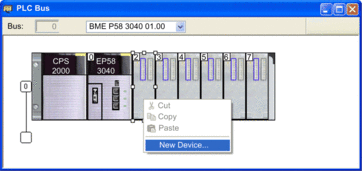 NOTE: In this example, modules are added to the .
|
3 |
Select . The dialog opens: 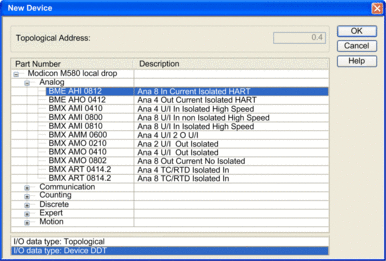 |
4 |
In the dialog, make the following selections:
NOTE: For a remote rack, Device DDT is pre-selected.
|
5 |
Click . The selected module is added to the and to the (below): 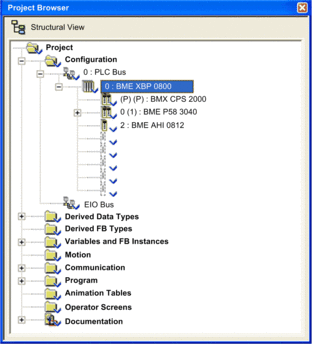 NOTE: If you add a module to the remote rack, it
appears beneath .
|
6 |
In the window, double-click on the Ethernet ports of the CPU. The window opens. |
7 |
In the tab, make the following selections:
|
8 |
In the toolbar, click the ( |
 ) button.
To configure the HART analog I/O module, right-click on the module in the , and then select .