


Analog Output Channels
The BMEAHO0412(C) HART analog output module includes 4 output channels. To open the module for configuration in Control Expert, double-click the output module in the :
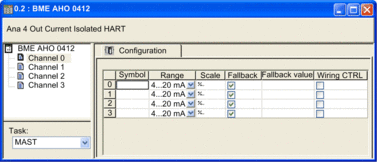
Channel Parameters
To configure an output channel, select that channel on the left side of the configuration dialog. You can edit the following parameters for each of the 4 channels:
Parameter |
Description |
|
|---|---|---|
Symbol |
(Read only) Displays the variable that has been associated with this channel. |
|
Range |
(Read only) Displays the current loop range of 4...20 mA. |
|
Scale |
Click in this field to open the following dialog where you can input scaling and overflow parameters: 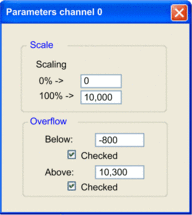 |
|
Scaling: 0%: |
Input the percentage scaling value for 4 mA current (default = 0). |
|
Scaling: 100%: |
Input the percentage scaling value for 20 mA current (default = 10,000). |
|
Overflow: Below |
The threshold between the lower tolerance area and the underflow area (default = –800). |
|
Overflow: Below (checkbox) |
The status of underflow control:
|
|
Overflow: Above |
The threshold between the upper tolerance area and the overflow area (default = 10,300). |
|
Overflow: Above (checkbox) |
The status of overflow control:
|
|
Fallback |
Use this checkbox to specify the behavior of the output when the PLC is in STOP mode or if communication between the PLC and the output module has stopped:
|
|
Fallback value |
If the parameter is selected, this value is assigned to the output on fallback. The range of available values is defined by the 0%...100% scaling settings. |
|
Wiring Ctrl |
The wiring control function checks for a broken wire. Use the checkbox to activate and de-activate wiring control, as follows:
|
|