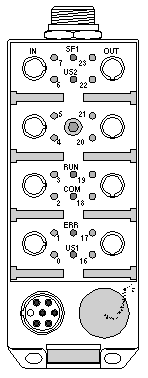
In the diagnostics phase, operating errors on the modules can be detected by looking at the status of the LED indicators on the front of the unit.
The following table describes how the RUN, COM and ERR LEDs of an module work.
|
LED
|
Color
|
Description
|
Illustration
|
|
RUN
|
Green
|
Module on:
-
off if the device in not operational,
-
continuously on if the device is operational,
-
flashing if the Fipio link is faulty due to there being another module at the same address.
|
|
|
COM
|
Yellow
|
Communication activity:
-
off if there is no activity on the Fipio bus or if the Fipio link has been stopped,
-
flashing during self-tests and during connection and initialization of the module,
-
flashing if the Fipio exchange phase is in progress.
|
|
ERR
|
Red
|
Module state:
-
off when module is operating normally,
-
flashing during self-tests and during connection and initialization of the module,
-
flashing if the module is not logically connected to the Fipio network,
-
continuously on in the event of a serious fault occurring which makes it necessary to replace the module.
|