


SNMP Agent
The module includes an SNMP v1 agent. An SNMP agent is a software component that allows access to the processor diagnostic and management information via the SNMP service.
SNMP browsers, network management software, and other tools typically use SNMP to access this data. In addition, the SNMP agent can be configured with the IP address of up to 2 devices–typically PCs running network management software–to be the target of event driven trap messages. These trap messages inform the management device of events such as cold start, and detected authentication failures.
Use the tab to configure the SNMP agent in the processor. The SNMP agent can connect to and communicate with up to 2 SNMP managers as part of an SNMP service. The SNMP service includes:
authentication checking, by the processor, of any SNMP manager that sends SNMP requests
management of event, or trap, reporting by the processor
The dialog:
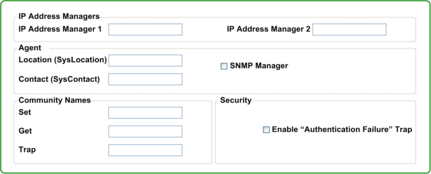
Configuring SNMP Properties
The module includes the following SNMP properties:
Property |
Description |
|---|---|
|
|
|
The IP address of the first SNMP manager to which the SNMP agent sends notices of traps. |
|
The IP address of the second SNMP manager to which the SNMP agent sends notices of traps. |
|
|
|
The device location (32 characters maximum) |
|
Information describing the person to contact for device maintenance (32 characters maximum). |
|
When this checkbox is:
Default = de-selected. |
|
|
|
Password required by the SNMP agent before executing read commands from an SNMP manager. 16 characters maximum. Default = . |
|
Password required by the SNMP agent before executing write commands from an SNMP manager. 16 characters maximum. Default = |
|
Password an SNMP manager requires from the SNMP agent before the manager will accept trap notices from the agent. 16 characters maximum. Default = NOTE:
|
|
|
|
If an unauthorized manager sends a Get or Set command to the SNMP agent, the agent sends a trap notification message to the manager. Default = de-selected. |