


At a Glance
The module diagnostics function displays detected errors, classified according to category:
Internal detected error:
module detected malfunction
self-testing detected error
External events:
Wiring control (broken-wire)
Under range/over range
Other detected errors:
configuration detected error
module missing or off
inoperative channel
A detected module error is indicated by a number of LEDs changing to red, such as:
in the rack-level configuration editor:
the LED of the rack number
the LED of the slot number of the module on the rack
in the module-level configuration editor:
the Err and I/O LEDs, depending on the type of detected error
the Channel LED in the Channel field
Procedure
The table below shows the procedure for accessing the module Fault screen.
Step |
Action |
|---|---|
1 |
Open the module debugging screen. |
2 |
Click on the module reference in the channel zone and select the Fault tab. NOTE: It is not possible to access the module diagnostics screen if one
of the following conditions is detected:
The following message then appears on the screen: " |
Result: The list of module detected errors appears. 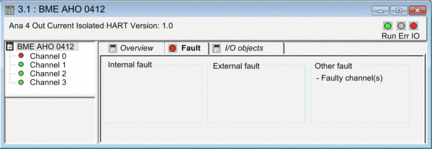 |
|