


At a Glance
Use this function to modify the forcing, fallback, and alignment values for one or several output channels of an analog module.
The available commands include:
forcing
fallback
alignment
Procedure
To modify the values to be applied at the output channels, follow these steps:
Step |
Action for a Channel |
|---|---|
1 |
Access the tab. |
2 |
Select the channel in the display zone and double-click in the corresponding box. Result: The dialog box appears. 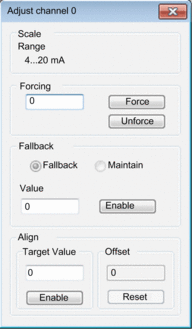 |
3 |
Place the cursor in the field. Enter the forcing value. Send the forcing order by clicking the button. |
4 |
Place the cursor in the field and enter the new fallback value. Confirm this new value by clicking . |
5 |
In the area, place the cursor in the field, and then input a target value. Confirm this selection by clicking . |
6 |
Close the dialog. |