


At a Glance
Use this function to modify the filter, alignment and forcing value of one or more channels of an analog input module.
The available commands include:
forcing
filter
alignment
To align several analog channels on the X80 input modules, we recommend proceeding channel by channel. Test each channel after alignment before moving to the next channel, in order to apply the parameters correctly.
Procedure
To modify the filter, forcing and alignment values, follow these steps:
Step |
Action for a channel |
|---|---|
1 |
Access the debug screen. |
2 |
Select the channel to be modified in the Display zone and double-click in the corresponding box. Result: The dialog opens: 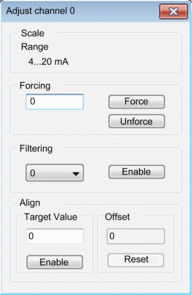 |
3 |
Place the cursor in the field. Enter the forcing value. Send the forcing order by clicking the button. |
4 |
Click the drop-down menu in the field, and define the new selected filter value. Confirm this selection by clicking . |
5 |
Place the cursor in the field, then input a target value. Confirm this selection by clicking . |
6 |
Close the dialog. Results: The new filter, forcing or alignment value appears in the box corresponding to the selected channel in the tab. |