


Introduction
To facilitate communications with the BMENOR2200H module, configure parameters for the DNP3 communication protocols in the CLIENT PARAMETERS or SEVER PARAMETERS tab in the DTM.
Access the Configuration Tab
Access the configuration parameters in Control Expert:
Step |
Action |
|---|---|
1 |
|
2 |
Confirm that you already created client or server channels. |
3 |
In the menu, expand () the sub-menu. |
4 |
Make a selection in the /Devices sub-menu: |
5 |
Select a specific channel/device in the sub-menu. |
6 |
Select the CLIENT PARAMETERS or SEVER PARAMETERS tab for the channel. |
7 |
Configure the parameters. |
8 |
|
DNP3 Device Parameters Description
The tables below describe the DNP3 net client/server parameters that appear on the CLIENT/SEVER PARAMETERS tab.
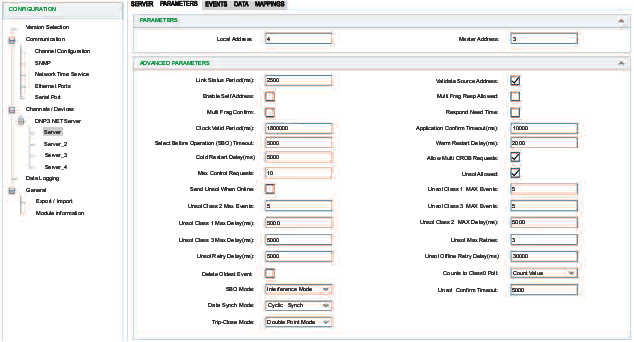
:
Parameter |
Client |
Sever |
Channel Independence1 |
Description |
|---|---|---|---|---|
|
✔ |
✔ |
✔ |
This field contains the source address for this session. |
|
✔ |
✔ |
✔ |
This field contains the remote client (destination) address for this session. |
| Default Response Timeout | ✔ | Enter
a value for the default timeout for the confirmation of request.
|
:
Parameter |
Client |
Sever |
Description |
|
|---|---|---|---|---|
|
✔ |
✔ |
✔ |
Configure the frequency (ms) for
the transmission of status requests when no DNP3 frames are received during this session.
NOTE: Confirm that the link
status period of client and server is set to a non-zero value, such
as 2s. If the link status period is set to zero, during a Hot Standby
switch-over, the module cannot create a new connection because the
old connection is not in time out.
|
| Auto Integrity Local | ✔ | Issue integrity data poll after local IIN bit was set and cleared.
|
||
| Auto Integrity Timeout | ✔ | Issue integrity data poll on time out.
|
||
| Auto Event Poll | ✔ | Issue
event data poll when class 1,2, or 3 IIN bit is set.
|
||
| Auto Delay Measure | ✔ | Use delay measurement in time sync.
|
||
| Auto Time Sync | ✔ | Perform
time sync on need time (slave IIN bit set).
|
||
| Auto Unsolicited | ✔ | Automatically send unsolicited command upon remote device startup.
|
||
| Auto Enable Unsol Class1 | ✔ | Indicate which event classes should be enabled for unsolicited reporting.
|
||
| Auto Enable Unsol Class2 | ✔ | Indicate which event classes should be enabled for unsolicited reporting.
|
||
| Auto Enable Unsol Class3 | ✔ | Indicate which event classes should be enabled for unsolicited reporting.
|
||
| Read Timeout Allowed | ✔ | Number of times a read request is allowed to timeout before the session is considered offline.
|
||
| Auto Integrity Overflow | ✔ | Auto
Integrity Overflow.
|
||
|
✔ |
✔ |
Select this box to validate the source address in received frames. |
|
|
✔ |
✔ |
Select this box to have the server respond to address 0xfffc as if it received a request at its configured address. The server responds with its own address so that the client can automatically discover the server address. |
|
|
✔ |
✔ |
Select this box to allow the application to send multi-fragment responses. |
|
|
✔ |
✔ | Select this box to request application layer confirmations for non-final fragments of a multi-fragment response. (Application layer confirmations are always requested for responses that contain events.) |
|
|
✔ |
✔ | Select this box to tell the device to set the Need Time IIN bit in response to this session at start-up after the clock valid period elapses. |
|
|
✔ |
✔ | Configure the length of time (ms) that the local clock remains valid after it receives a time synchronization. |
|
|
✔ |
✔ | Configure the length of time (ms) that the server DNP3 device waits for an application layer confirmation from the client for a solicited response. |
|
|
✔ |
✔ | Configure the maximum amount of time (ms) that a selection remains valid before the corresponding operate is received. |
|
|
✔ |
✔ | Configure the length of time that the client waits after it receives a response to a warm restart request. This value is encoded in a time delay fine object in the response of a warm restart request. |
|
|
✔ |
✔ | Configure the length of time (ms) that the client waits after it receives a response to a cold restart request. This value is encoded in a time delay fine object in the response of a cold restart request. |
|
|
✔ |
✔ | Select this box to allow multiple control relay block objects (CROBs) in a single request. |
|
|
✔ |
✔ | Configure the maximum number of binary (CROB) or analog control outputs that are allowed in a single request. |
|
|
✔ |
✔ | Select this box to allow unsolicited responses. |
|
|
✔ |
✔ | Select this box to send unsolicited null responses when the session comes online. |
|
|
✔ |
✔ | When unsolicited responses are enabled, configure this value to specify the maximum number of events in the corresponding class (1, 2, or 3) that are allowed before an unsolicited response is generated. |
|
|
✔ |
✔ | ||
|
✔ |
✔ | ||
|
✔ |
✔ | Configure the maximum amount of time (ms) after an event in the corresponding class (1, 2, or 3) is received before an unsolicited response is generated. |
|
|
✔ |
✔ | ||
|
✔ |
✔ | ||
|
✔ |
✔ | Configure the maximum number of unsolicited retries before changing to the offline retries value. |
|
|
✔ |
✔ | Configure the length of the delay (ms) after an unsolicited response. |
|
|
✔ |
✔ | Configure the length of the delay (ms) after an unsolicited timeout before retrying the unsolicited response after the configured number of . |
|
|
✔ |
✔ | Configure the behavior for an event queue that is full:
|
|
|
✔ |
✔ | Configure the type of value that is returned in a poll of class 0 data:
|
|
|
✔ |
Select a mode for a before-and-after operation:
|
||
|
✔ |
✔ | Configure the value for an unsolicited confirm timeout. |
|
|
✔ |
Select a data synchronization mode:
|
||
Trip-Close Mode |
✔ |
Select an option:
|
||
|
This string is part of the variable name for analog or binary output points when you select as the (range: 1 ... 6). Considerations:
|
|||
NOTE: 1 The
parameters ticked in the column Channel Independence can be
configured independently and respectively on each sever channel, once
the multiple-session function is enabled.
|
||||