


Introduction
Use these instructions to configure the IP address parameters for a BMENOR2200H module. There are two different IP addresses that can be assigned to the module. The IP address of backplane port is configured by Control Expert, and that of control ports is configured by DTM.
Configure IP Address for Backplane Ethernet Port
Access the in Control Expert:
Step |
Action |
|---|---|
1 |
Open a Control Expert project that includes a BMENOR2200H module. |
2 |
Double-click the BMENOR2200H module to see the tab. 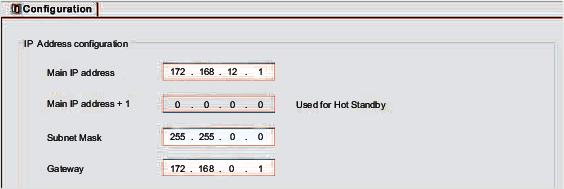 |
3 |
Configure these parameters:
NOTE: The Main IP address + 1 field is used
for configuring a redundant system.
|
4 |
|
Configure IP Address for Control Ports
Two control ports share a same IP address. The IP address should be configured manually in the DTM. For details, you can refer to Control Ports Configuration.
Limitations
The BMENOR2200H module uses the FDR client basic service to get IP parameters from the controller.
This module does not support DHCP or BOOTP.
This module does not locally store static IP parameters.
For details, refer to the description of the FDR client service configuration.