


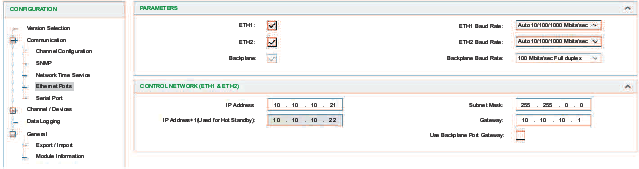
Enable/Disable Control Ports
When the Version Selection is firmware version >=4.0, follow the below steps to enable the control ports:
Step |
Action |
|---|---|
1 |
|
2 |
In the menu, expand () the sub-menu. |
3 |
Click the sub-men to see the PARAMETERS: NOTE: The default value of the two front control ports is set
to disabled (deselected). Backplane port is mandatory enabled as 100M
bits/sec.
|
4 |
Enable the ports by checking the corresponding boxes.. |
5 |
|
Control Network (ETH1 & ETH2)
The parameters below can be configured manually once the control ports have been enabled:
Parameters |
Description |
|---|---|
IP Address |
Enter the IP address: two control ports share a same IP address. |
Subnet Mask |
Enter a subnet mask for control ports that corresponds to the IP address. |
Default Gateway |
This is the IP address of the default gateway for control ports/back Ethernet port to which messages for other networks are transmitted |
IP address + 1 |
The IP address + 1 field is used for configuring a redundant system. |
Use Backplane Port Gateway |
If this check box is selected, the gateway is set in backplane port domain. |
|
|
Baud Rate Setting
Auto 10/100/1000 Mbits/sec
100 Mbits/sec Half duplex
100 Mbits/sec full duplex
10 Mbits/sec Half duplex
10 Mbits/sec full duplex