|
Configuration of an IP67 Input/Output Module: General
|
|


|
(Original Document)
|
|
Configuration of an IP67 Input/Output Module: General
|
|
|
(Original Document)
|
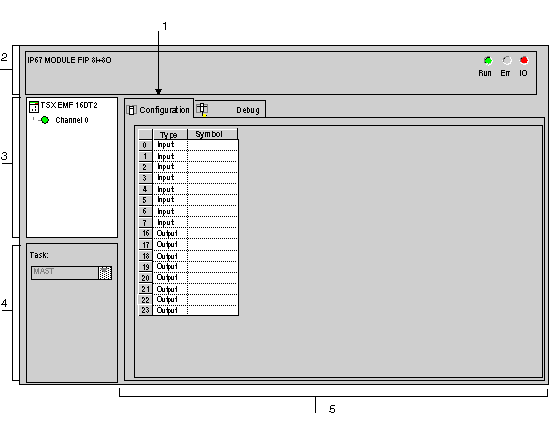
|
Number
|
Element
|
Function
|
|---|---|---|
|
1
|
Tabs
|
The tab in the foreground indicates the mode in progress (Configuration in this example). Every mode can be selected using the respective tab. The available modes are:
|
|
2
|
Module area
|
Gives a reminder of the device’s shortened name.
|
|
3
|
Channel area
|
Is used:
|
|
4
|
General parameters area
|
This area is used to define the task (MAST or FAST) in which the channel implicit exchange objects will be exchanged.
|
|
5
|
Configuration area
|
The Type column displays the Input or Output type associated with the channel.
The Symbol column displays the symbol associated with the input or output when it has been defined by the user (using the variable editor).
|
