At a Glance
The application used here as an example manages liquid levels in a tank. The tank is filled by a pump and drained using a valve. The different levels of the tank are measured with sensors placed above the tank. Do not fill the tank with more than 100 liters of liquid.
Once the tank is full, the pump stops, and the operator drains the tank manually.
This application requires the use of a BMEAHI0812(H) analog input module and a BMEAHO0412(C) analog output module.
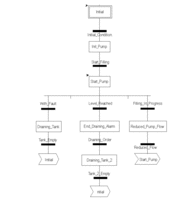
Tank Management Grafcet
The application grafcet is as follows:
Using the Measurements
This example configures the BMEAHI0812(H) analog input module to retrieve the level of the liquid in the tank.
Step |
Action |
|---|---|
1 |
In the and in , double-click . |
2 |
Create the |
3 |
In the column, enter the address associated with this variable. In this example, consider that the sensor is connected to channel 0 of the BMEAHI0812(H) module. This module is in turn connected to slot 1 of rack 0. Therefore the address is: %MW0.1.0. Illustration: |

This variable can be used to check whether the level of liquid in the tank has reached maximum level.
The following line of code can be associated with the Level_Reached transition of the grafcet.

If the level of liquid in the tank reaches or exceeds the
maximum level, the Level_Reached transition is enabled.
Using the Statuses
Program
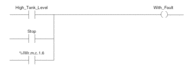
the With_fault transition to stop the pump in 3 cases:
the maximum liquid level has been reached
the pump has been stopped manually
the measurement falls beyond the upper tolerance area
To be able to use the bit, which will indicate whether the measure still falls within the upper tolerance area (%IWr.m.c.1.6), first define the display format and scale of the channel used.
Step |
Action |
|---|---|
1 |
Access the hardware configuration screen for the appropriate module. |
2 |
The range |
4 |
Access the dialog box for the channel in order to input the following parameters 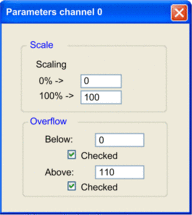 The upper tolerance area will be 100...110 liters. |
5 |
Confirm your changes by closing the dialog box. |
6 |
Validate the change with . |
The code associated with the fault control transition looks like this: