


Introduction
Explicit exchanges are performed at the user program's request, using the following instructions:
READ_STS: read status wordsWRITE_CMD: write command wordsWRITE_PARAM: write adjustment parametersREAD_PARAM: read adjustment parametersSAVE_PARAM: save adjustment parametersRESTORE_PARAM: restore adjustment parameters
These exchanges apply to a set of %MW objects
of the same type (status, commands, or parameters) that belong to
a channel.
WRITE_PARAM and RESTORE_PARAM requests at the same time to
the channels managed by the same logical nodes, The logical node can
only process one request, the other request will generate an error.To
avoid this kind of errors you have to manage the exchange for each
channel with %MWr.m.c.0.x and %MWr.m.c.1.x.General Principle for Using Explicit Instructions
The diagram below shows the different types of explicit exchanges that can be made between the processor and module.
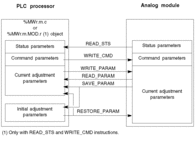
Example of Using Instructions
READ_STS instruction:
The READ_STS instruction is used to read SENSOR_FLT (%MWr.m.c.2) and NOT_READY (%MWr.m.c.3) words. It is therefore possible to determine with greater precision
the errors which may have occurred during operation.
Performing
a READ_STS of all the channels would result in overloading
of the PLC. A less burdensome method would be to test the error bit
of all the modules in each cycle, and then the channels of the modules
in question. You would then only need to use the READ_STS instruction on the address obtained.
The algorithm could look like this:
WHILE (%I0.m.ERR <> 1) OR (m <= Number
of modules) THEN
m=m+1
Loop
END WHILE
WHILE (%I0.m.c.ERR <> 1) OR (c <= Number of channels) THEN
c=c+1
Loop
END WHILE
READ_STS (%I0.m.c)
WRITE_PARAM instruction:
The WRITE_PARAM instruction is used to modify certain configuration
parameters for the modules during operation.
All you need to
do is to assign the new values to the relevant objects and use the WRITE_PARAM instruction on the required channel.
For
example, you can use this instruction to modify the fallback value
by program (only for output analog modules). Assign the required value
to the Fallback (%MWr.m.c.7) word
and then use the WRITE_PARAM instruction.