


Introduction
EcoStruxure Control Expert provides M580 Hot Standby System diagnostic information in these GUI screens:
the Hot Standby status viewer embedded in the EcoStruxure Control Expert Task Bar.
the tab of the controller window
Hot Standby Status Viewer
When EcoStruxure Control Expert is connected to the Hot Standby system, it displays the Hot Standby status of each controller, including:
The status of controllers A and B.
The comparative state of logic running in the standby controller.
If a logic mismatch exists, the number of modifications made to the application running in the primary controller.
The Hot Standby Status Viewer looks like this:
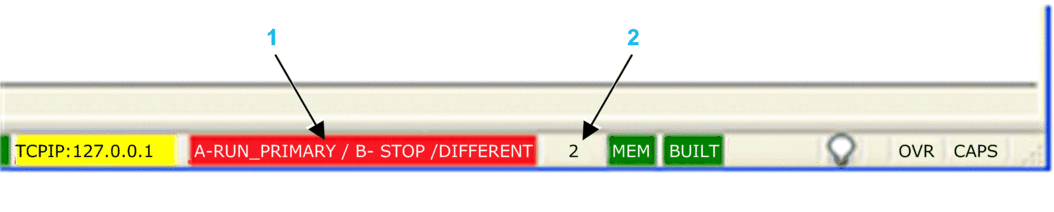
1 Hot Standby status
2 Number of changes
The status values for controllers A and B include:
RUN_PRIMARY
RUN_STANDBY
STOP
WAIT
Also presented is the logic state of the standby controller, which can be either:
EQUAL (green background): There is no logic mismatch.
DIFFERENT (red background): Online changes have been made to the primary controller application that have not been transferred to the standby controller.
An additional status information is displayed when at least one task (MAST, FAST, or SAFE) is not synchronized between the Primary and the Standby controllers: TASK NOSYNC (red background):

In this case, analyze "MAST_SYNCHRONIZED", "FAST_SYNCHRONIZED" and "SAFE_SYNCHRONIZED" data provided in T_M_ECPU_HSBY DDT to detect the task which is not synchronized.
Hot Standby Information Tab
Use the controller configuration window tab to view the status of the Hot Standby system:
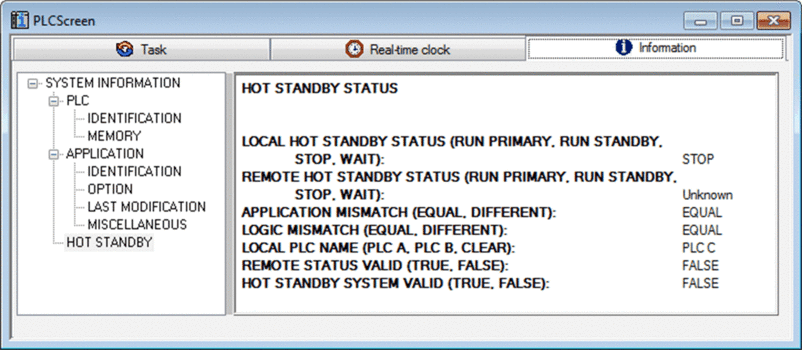
The tab contains one word of status data:
Hot Standby status of the local controller:
|
Local controller name (position of A/B/Clear rotary selector switch):
|
Hot Standby status of the remote controller:
|
Remote status valid:
|
Application mismatch status:
|
Hot Standby system valid:
|
Logic mismatch status:
|
– |