


Introduction
There are three RJ45 Ethernet ports on the front of the controller: one service port, and two device network ports. The ports share the characteristics described below.
Common Characteristics
The three ports have the same RJ45 connector and use the same type of Ethernet cables.
Dust Cover
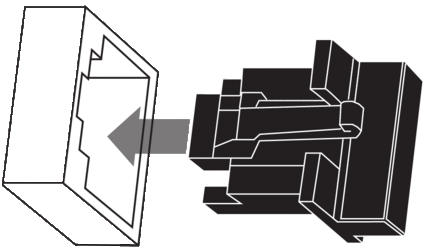
To keep dust from entering the unused Ethernet ports, cover the unused ports with the stopper:
Ethernet Ports
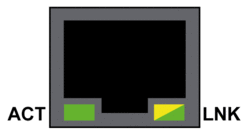
Each RJ45 connector has a pair of LED indicators:
The pin positions, pinouts, and cable connections are the same on the three RJ45 Ethernet ports:
Pin |
Description |
|
|---|---|---|
1 |
TD+ |
Pinout: 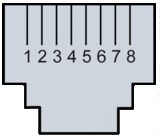 |
2 |
TD- |
|
3 |
RD+ |
|
4 |
not connected |
|
5 |
not connected |
|
6 |
RD- |
|
7 |
not connected |
|
8 |
not connected |
|
— |
shell/chassis ground |
|
The ports have an auto MDIX capability that automatically detects the direction of the transmission.
It is required to use one of these Ethernet cables to connect to the Ethernet ports:
TCSECN3M3M••••: Cat 5E Ethernet straight-through shielded cable, rated for industrial use, CE- or UL-compliant
TCSECE3M3M••••: Cat 5E Ethernet straight-through shielded cable, rated for industrial use, CE-compliant
TCSECU3M3M••••: Cat 5E Ethernet straight-through shielded cable, rated for industrial use, UL-compliant
The maximum length for a copper cable is 100 m. For distances greater than 100 m, use fiber optic cable. The controller does not have fiber ports. You may use dual ring switches (DRSs) or BMX NRP •••• fiber converter modules to handle the copper-fiber conversion.
Ethernet Ports on Standalone Controllers
On standalone controllers, the ACTIVE LED is green. The LNK LED is either green or yellow, depending on the status:
LED |
LED Status |
Description |
|---|---|---|
ACTIVE |
OFF |
No activity is indicated on the Ethernet connection. |
ON / flashing |
Data is being transmitted and received on the Ethernet connection. |
|
LNK |
OFF |
No link is established at this connection. |
ON green |
A 100 Mbps link* is established at this connection. |
|
ON yellow |
A 10 Mbps link* is established at this connection. |
|
* The 10/100 Mbps links support both half-duplex and full-duplex data transfer and autonegotiation. |
||
Service Port
The service port is the uppermost of the three Ethernet ports on the front panel of the controller. This port can be used:
to provide an access point that other devices or systems can use to monitor or communicate with the M580 PAC
as a standalone DIO port that can support a star, daisy chain, or mesh topology of distributed equipment
to mirror the controller ports for Ethernet diagnostics. The service tool that views activity on the mirrored port may be a PC or an HMI device.
The service port does not support the RSTP network protocol. Connecting the service port to the device network, either directly or through a switch/hub, can result in the creation of logical loops in the network, which can adversely affect network performance.
The service port does not support either VLANs or QoS tagging of Ethernet packets. The service port is inherently non-deterministic.
| WARNING | |
|---|---|
Device Network Dual Ports
When a controller does not support RIO scanning, the two ports below the service port marked Device Network are DIO ports.
These controllers do not support RIO scanning:
BMEP581020 and BMEP581020H
BMEP582020 and BMEP582020H
BMEP583020
BMEP584020
You may use a Device Network port to support a star, daisy chain, or mesh topology of distributed equipment. You may use both Device Network ports to support a ring topology.
When a controller supports RIO scanning, the two ports below the service port marked Device Network are RIO ports. These controllers support RIO scanning:
BMEP582040, BMEP582040H
BMEP583040
BMEP584040
BMEP585040, BMEP585040C
BMEP586040, BMEP586040C
BMEH582040, BMEH582040C
BMEH584040, BMEH584040C
BMEH586040, BMEH586040C
When used as RIO ports, both ports connect the controller to the main ring in an Ethernet daisy-chain loop or ring.
For more information about RIO/DIO architectures, refer to the chapter Modicon M580 System.
Grounding Considerations
Follow all local and national safety codes and standards.
| DANGER | |
|---|---|
The backplane for your M580 PAC is common with the functional ground (FE) plane and must be mounted and connected to a grounded, conductive backplane.
| WARNING | |
|---|---|